Disclosure
This guide contains affiliate links (marked ad) and promotes tools we built (marked (ad — own product)). We earn a commission on purchases through affiliate links, at no extra cost to you. AutoKeyWorder is our own product. Freepik and Kie.ai are third-party products we promote as affiliates.
This is Module 1 of the AI Income Blueprint. Start there if you haven’t picked your stream yet.
How Selling Stock Photos Online Works
You upload images to stock platforms. They sell licenses to businesses. You earn per download. That’s the core of how to sell stock photos online.
Adobe Stock pays 33% royalties. A single image licensed by a marketing agency might earn $0.33 to $3.30 per download. Freepik (ad) runs a subscription model with lower per-download rates but higher volume.
The business model compounds. Upload 500 images once, and they keep earning every month without additional work. Your portfolio is the asset.
Real Earnings: January - March 2026 (First 3 Months)
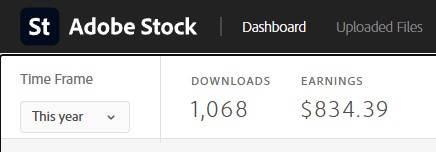
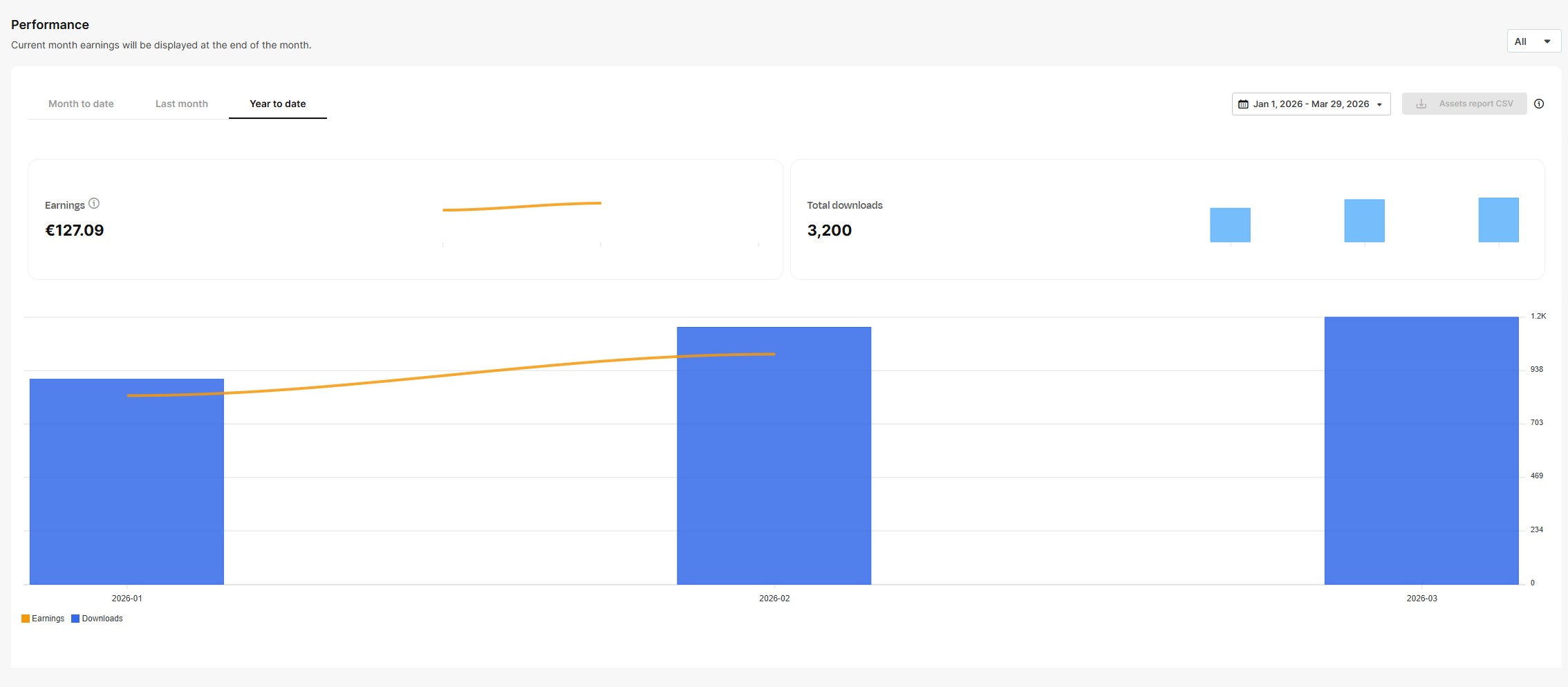
Adobe Stock: $834 from 1,068 downloads. Freepik: €127 from 3,200 downloads. Both from the same portfolio, cross-posted.
What is AI stock photography? AI stock photography uses text-to-image generators to create professional photos for licensing on platforms like Adobe Stock and Freepik. Contributors generate images, add keyword metadata, and earn royalties each time a buyer licenses an image. No camera or studio required.
Table of Contents
- Step 1: Research What Sells
- Step 2: Pick the Right AI Model
- Step 3: Write Prompts That Produce Stock-Quality Images
- Step 4: Generate Your First Batch
- Step 5: Keyword and Metadata
- Step 6: Upload and Go Live
- Platform Comparison
- Common Mistakes
Step 1: Research What Sells
Most beginners generate what looks cool and hope someone buys it. That’s backwards. Stock photography is a search engine. Buyers type a keyword, browse results, and license the best fit. If nobody searches for your topic, nobody finds your image.
Research first. Generate second.
Where to Find Profitable Niches
| Source | What You Learn | How to Access (Free) |
|---|---|---|
| Google Trends | What people search for right now, rising queries, seasonal patterns | trends.google.com - enter keywords, check “Rising” tab |
| Freepik Contributor Trends | What buyers actively search for on Freepik | contributor.freepik.com/search-trends (free contributor account) |
| Adobe Stock Search | Supply level per keyword, gap analysis | stock.adobe.com - search a keyword, compare “Most Relevant” vs “Newest” |
| Unsplash Trends | Editorial demand signals, growth percentage per topic | unsplash.com/trends |
| Google News | Breaking topics that need stock images now | news.google.com - if it’s in the news, buyers need images for it |
| Real conversations about what industries need visuals | r/marketing, r/graphic_design, r/web_design, r/Entrepreneur |
The Research Method
Cross-reference two or three sources. A topic trending on Google Trends AND appearing in news headlines AND underserved on Adobe Stock is a high-confidence opportunity.
How to spot the gap:
- Search your topic on Adobe Stock
- Look at the top 30 results
- Ask: Are all models the same ethnicity? Is every shot horizontal? Is the color grading stuck in 2018? Is there copy space for text overlay?
- If the answer to any of these is yes, that’s your gap
A South Asian family cooking in a modern kitchen has far less competition than a blonde woman smiling in a white kitchen. A vertical business shot with copy space beats another centered horizontal headshot. The gap is where the money is.
Signal Weighting
Not all research sources carry equal weight.
| Source | Weight | Why |
|---|---|---|
| Google News headlines | Highest | Published articles = buyers need images right now |
| Google Trends “Rising” | High | Search demand before supply catches up |
| Freepik Contributor Trends | High | Direct buyer demand from a stock platform |
| Adobe Stock search results | Medium | Shows supply level, not demand |
| Unsplash Trends | Low-Medium | More editorial than commercial |
The golden rule: If two or more independent sources agree on the same topic, your confidence is high.
Seasonal Calendar
Plan 6-8 weeks ahead. Stock images for Christmas sell best if uploaded in October. Tax season images peak January through April. Back-to-school is July through September.
| Season | Upload By | Topics |
|---|---|---|
| Tax season | November | Finance, accounting, small business, paperwork |
| Valentine’s Day | December | Couples, romance, flowers, restaurants |
| Spring/wellness | January | Fitness, outdoor, gardening, fresh food |
| Back-to-school | June | Education, supplies, classrooms, families |
| Halloween | August | Costumes, decorations, fall themes |
| Holiday season | September | Christmas, gifts, winter, family gatherings |
Step 2: Pick the Right AI Model
Different models excel at different subjects. Using the wrong model for the job wastes your time and produces weaker results.
The Decision Rule
Does the image have a person in it?
That’s it. Two models cover 95% of stock photography.
| Model | Best For | Cost | Why |
|---|---|---|---|
| Seedream 4.5 | Objects, food, landscapes, interiors, technology | ~$0.032/image | Clean rendering of non-human subjects. No face/hand artifacts. |
| Nano Banana Pro | People, lifestyle, business, portraits | ~$0.09/image | Handles skin texture, facial expressions, hands, and body proportions. |
When to Use Seedream 4.5
Any scene without a visible person. Food photography, product shots, workspace setups, nature, architecture, technology close-ups. Seedream produces clean, photorealistic output at a lower cost.
When to Use Nano Banana Pro
Any scene with a human subject. Business meetings, lifestyle moments, fitness, healthcare, family scenes. NB Pro handles the details that trip up other models: skin texture, realistic hands, natural poses, facial micro-expressions.
People shots require more detailed prompts. The Prompt Engineering module covers the basics, or you can use the NB2 Prompt Generator (ad — own product) to generate production-ready prompts from a simple description.
Step 3: Write Prompts That Produce Stock-Quality Images
A good prompt is the difference between an image that earns and one that sits unnoticed. Stock photos need to feel real, serve a commercial purpose, and avoid common AI artifacts.
Universal Rules (Apply to Every Prompt)
| Rule | Why |
|---|---|
| Minimum 5 concrete nouns | Highest quality correlation across all models |
| No beauty words (“beautiful”, “stunning”, “gorgeous”) | Triggers plastic, over-processed look |
| No hex color codes (#FF0000) | Renders as visible text artifacts in the image |
| No render engine names (“Octane”, “Unreal Engine”) | Zero measurable effect on output |
| No resolution keywords (“8K”, “ultra HD”) | Zero measurable effect on output |
| Always include anti-text constraint | Without it, ~40% of images contain random gibberish text |
| One scene per prompt | Combined scenes produce incoherent results |
Seedream Prompt Formula (No People)
[Editorial/Professional] photograph of [subject with 5+ concrete nouns].
[Setting with 2-3 surface materials]. [One lighting sentence with direction + color temp].
[Dynamic moment, e.g. "caught mid-", "steam rising", "just sliced"].
[Camera perspective, e.g. bird's-eye, macro, 45-degree overhead].
No 3D render, no illustration, no CGI, no watermark, no text.
Target length: 80-150 words. Natural prose, not tag lists.
Example Prompts (Seedream 4.5)
Food:
Editorial photograph of a cast-iron skillet filled with sizzling shakshuka, three eggs nestled in chunky roasted tomato sauce, scattered fresh cilantro leaves, crumbled feta cheese, and a torn piece of sourdough bread resting on the skillet rim. Weathered oak cutting board underneath, linen napkin bunched to the left. Single overhead warm directional light casting deep shadows into the skillet basin, steam caught mid-rise from the bubbling sauce. Extreme close-up, 45-degree overhead angle. No 3D render, no illustration, no CGI, no watermark, no text.
Technology:
Professional photograph of a disassembled mechanical keyboard mid-repair on a matte black desk. Cherry MX switches scattered across an anti-static mat, brass tweezers gripping a single switch, keycaps arranged in a color gradient from white to charcoal. Warm desk lamp from upper left throwing long shadows across PCB traces. Macro perspective, shallow focus on the tweezers. No 3D render, no illustration, no watermark, no text.
Workspace:
Editorial photograph of an architect’s drafting table covered in blueprints, a wooden scale ruler, mechanical pencils in a leather roll, and a half-empty ceramic coffee mug with a dried ring stain. Morning light from a floor-to-ceiling window casting long parallel shadows across the paper. Wide-angle shot at desk height, shallow depth of field blurring the window behind. No 3D render, no illustration, no CGI, no watermark, no text.
Wellness:
Professional photograph of a jade gua sha stone and rosemary oil bottle on a folded linen towel, white marble bathroom counter. A single eucalyptus sprig and two rolled hand towels beside them. Soft diffused daylight from the right, warm white color temperature. Close-up at counter level, 30-degree angle. No 3D render, no illustration, no watermark, no text.
Nature:
Editorial photograph of a single monarch butterfly perched on a wild thistle flower, wings fully spread. Morning dew droplets visible on the wing scales. Background is a soft bokeh field of purple wildflowers. Golden hour backlighting catching the translucent wing edges. Macro lens perspective, eye-level with the flower. No CGI, no illustration, no watermark, no text.
Nano Banana Pro Prompts (People)
People shots need structured, detailed prompts to avoid the “AI look.” The full framework covers appearance, wardrobe, pose, environment, camera settings, and lighting.
A simplified example:
Professional lifestyle photograph of a woman in her early 30s reviewing architectural plans spread across a reclaimed wood conference table. She wears a fitted olive blazer over a white crew-neck tee, sleeves pushed to mid-forearm. Caught mid-gesture, right hand holding a mechanical pencil pointing at a floor plan detail. Modern co-working space with exposed brick wall and pendant Edison bulbs. Canon EOS R5 with 50mm f/1.4 lens, medium shot from across the table. Natural window light from the left at 4500K, warm fill from Edison bulbs above. No airbrushing, no plastic skin, no 3D render, no watermark, no text.
Writing detailed people prompts takes practice. The Prompt Engineering module covers the essentials. For production-quality prompts without the learning curve, the NB2 Prompt Generator (ad — own product) creates the full structured prompt from a short description like the one above.
What Gets Rejected
Stock platforms reject images with these issues:
- Visible text artifacts (random letters, numbers, symbols)
- Extra fingers, fused hands, deformed anatomy
- Brand logos or recognizable product designs
- Celebrity likenesses
- Excessive AI smoothing (“plastic skin”)
- Resolution below 4MP
The anti-text constraint and the right model selection prevent most of these. Always zoom to 100% and check hands, faces, and any area with text before uploading.
Step 4: Generate Your First Batch
The workflow for your first 20 images:
- Pick a niche from your research (Step 1). Start narrow: “remote work home office” not just “business.”
- Write 20 prompts using the formulas above. Vary the scenario, demographic, angle, and lighting within your niche.
- Generate on Kie.ai (ad). Use Seedream 4.5 for scenes without people, Nano Banana Pro for scenes with people.
- Review at 100% zoom. Check hands, faces, text artifacts, and overall composition.
- Keep the top 10-15. Reject anything with visible artifacts, poor composition, or that doesn’t serve a commercial purpose.
Cost for 20 images: $0.64 (Seedream) to $1.80 (NB Pro). Under $2 for your first batch.
Quality beats quantity. Ten strong images with good keywords outperform 100 mediocre uploads every time.
Step 5: Keyword and Metadata
This is the step that separates images that earn from images that sit at zero downloads.
Stock platforms are search engines. Buyers type keywords, browse results, license what fits. If your keywords don’t match what buyers search for, your image is invisible.
Why Keywords Matter More Than Image Quality
A mediocre image with perfect keywords gets found and downloaded. A perfect image with bad keywords gets buried on page 50. The math is simple: discoverability drives revenue.
Manual Keywording (Free, Slow)
For each image:
- Write a descriptive title (under 200 characters for Adobe Stock)
- Add 20-35 relevant keywords
- Select the right category
- Flag as AI-generated where required
At 3 minutes per image, a batch of 50 takes over 2 hours. By image 30, you’re recycling the same keywords and missing niche-specific terms that buyers search for.
Automated Keywording with AutoKeyWorder (Fast)
AutoKeyWorder (ad — own product) analyzes your image and generates 25-50 relevant keywords in seconds. It handles titles, descriptions, and platform-specific tag formats.
The workflow:
- Paste your image into AutoKeyWorder
- Review the generated keywords (add or remove as needed)
- Copy to your platform’s upload form
What takes 3 minutes manually takes about 15 seconds. For a batch of 50 images, that’s 12 minutes instead of 2.5 hours.
Platform-Specific Metadata Requirements
| Platform | Title | Keywords | Category | AI Flag |
|---|---|---|---|---|
| Adobe Stock | Up to 200 chars | 15-35 required | One from Adobe taxonomy | Must check AI box |
| Freepik (ad) | Required | 5-50 | Auto-categorized | AI disclosure required |
| Shutterstock | Up to 200 chars | 7-50 | Two categories | AI-specific submission path |
Keyword Strategy Tips
- Front-load your most important keywords. Some platforms weight the first 5-10 keywords more heavily.
- Include both broad and specific terms. “business” AND “woman reviewing financial report in glass office.”
- Add format keywords. “horizontal”, “copy space”, “overhead view”, “close-up” help buyers find specific compositions.
- Think like a buyer. A designer searching for a hero image for a healthcare website types “doctor patient consultation modern clinic.” Match their search.
Step 6: Upload and Go Live
Where to Upload First
Start with two platforms. Master the workflow before expanding.
Adobe Stock (Priority #1)
- Highest revenue per download
- Professional buyer base with budgets
- Direct integration with Adobe Creative Cloud
- Sign up as a contributor
Freepik (Priority #2) (ad)
- High download volume (millions of subscribers)
- Strong European market
- Fast approval for AI content
- Good for building portfolio size and visibility early
Upload Checklist
- Image is minimum 4MP (most AI generators output 4K, which is fine)
- JPEG format, quality 90%+
- No visible text artifacts, hand deformities, or brand elements at 100% zoom
- Title is descriptive and keyword-rich
- 20-35 keywords added (use AutoKeyWorder (ad — own product))
- Category selected
- AI-generated flag checked
- Image serves a clear commercial purpose (not just “looks cool”)
After Upload
Approval takes 1-5 business days on Adobe Stock. Freepik is typically faster. Once approved, your images start appearing in search results.
Don’t check stats daily for the first two weeks. Focus on uploading your next batch. The first 100 images are the hardest. After that, you have data: which topics get views, which get downloads, which earn the most per download. Use that data to guide your next batch.
Platform Comparison
| Factor | Adobe Stock | Freepik (Aff.) | Shutterstock |
|---|---|---|---|
| Royalty Rate | 33% | Subscription pool | 15-40% (tier-based) |
| Revenue Per DL | $0.33-$3.30 | $0.01-$0.10 | $0.10-$0.50 |
| Buyer Quality | Agencies, enterprise | Designers, students, SMBs | Mixed |
| Volume | Medium-High | Very High | High |
| AI Acceptance | Yes (with flag) | Yes (with disclosure) | Yes (separate path) |
| Best For | Revenue per image | Volume and visibility | Catalog breadth |
Start with Adobe Stock + Freepik. Adobe for revenue quality, Freepik for volume. Add Shutterstock as a third channel once your workflow is dialed in.
Common Mistakes
Generating without research. You wouldn’t open a store without checking if people want to buy what you’re selling. Same principle. Research first.
Uploading everything. Be selective. Ten strong images beat fifty mediocre ones. Reject anything with artifacts, poor composition, or no clear commercial use.
Ignoring keywords. This is the #1 reason new contributors fail. An image without good keywords is invisible. Spend as much time on metadata as you do on generation.
Chasing trends too late. If you see a trending topic on Google Trends and it’s already at “peak,” you’re late. Look for “Rising” topics and seasonal needs 6-8 weeks out.
Same demographic in every image. Stock buyers actively seek diversity. Vary age, ethnicity, body type, and setting across your portfolio. The gaps in representation are where competition is thinnest.
Uploading to one platform. Cross-post the same images to Adobe Stock, Freepik, and Shutterstock. Each platform has different buyers. Same images, three revenue streams.
Frequently Asked Questions
How much can you earn selling stock photos online? A portfolio of 500 images typically earns $50-$150/month on Adobe Stock. Revenue per download ranges from $0.33 to $3.30. Your top 20% of images drive 80% of earnings. Income grows as your portfolio grows.
Do stock photo platforms accept generated images? Adobe Stock, Freepik, and Shutterstock accept generated images as of 2026. Each requires disclosure. Check platform policies before uploading, as rules evolve.
How many keywords should a stock photo have? Adobe Stock requires 15-35 keywords per image. Freepik accepts 5-50. Front-load your most relevant keywords. Use a mix of broad terms and specific descriptors.
Which stock photo platform pays the most? Adobe Stock pays 33% royalties with the highest revenue per download ($0.33-$3.30). Freepik has lower per-download rates but higher download volume. Most contributors upload to both.
How long until stock photos start earning? Approval takes 1-5 business days. First downloads typically arrive within 1-3 weeks if your keywords match buyer searches. Revenue compounds as your portfolio grows month over month.
Your Next Steps
- Research: Spend 30 minutes with Google Trends and Adobe Stock search. Find 3 underserved niches.
- Generate: Create 20 images on Kie.ai (ad). Seedream for objects, NB Pro for people.
- Keyword: Run them through AutoKeyWorder (ad — own product).
- Upload: Submit to Adobe Stock and Freepik (ad).
- Repeat: Upload a new batch every week. Aim for 100 images in your first month.
← Back to AI Income Blueprint | Next: Posters →
Part of the AI Income Blueprint series. See all modules and the full tools page.