Disclosure
This guide contains affiliate links (marked ad) and promotes tools we built (marked (ad — own product)). We earn a commission on purchases through affiliate links, at no extra cost to you. AutoKeyWorder is our own product. Kie.ai, eRank, and Placeit are third-party products we promote as affiliates.
This is Module 4 of the AI Income Blueprint. Start there if you haven’t picked your stream yet.
How to Sell Digital Art on Etsy
You create digital files. Buyers purchase and download them instantly. No shipping, no inventory, no fulfillment. Etsy is one of the best platforms to sell digital art because buyers actively search for downloadable design assets.
Etsy charges $0.20 per listing (lasts 4 months or until sold) plus ~6.5% transaction fee plus payment processing. On a $4.99 bundle, you keep roughly $4.00 after all fees.
The magic of Etsy digital products is leverage. Create one bundle of 50 SVG icons. List it once. Sell it a hundred times. Every sale after the first is pure profit minus the small platform fees.
Real Earnings: January - March 2026 (First 3 Months)
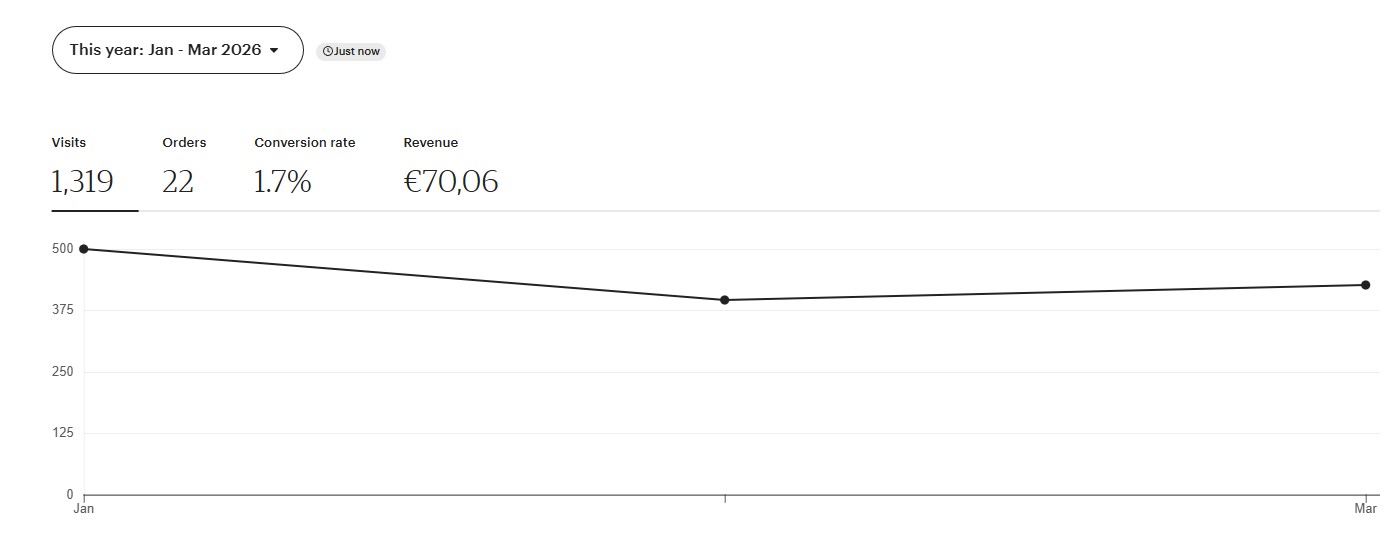
Etsy: €70 from 22 orders in Q1 2026. I haven’t uploaded new products to Etsy this year. These are residual sales from bundles uploaded in 2025, still earning without any additional work. That’s the compound effect of digital products.
What are Etsy digital products? Digital products on Etsy are files that buyers download instantly after purchase. For AI creators, the most profitable categories are SVG icon bundles, clipart sets, t-shirt designs, sticker sheets, and printable art. Buyers use these files for Cricut cutting machines, Silhouette plotters, print-on-demand products, and design projects.
Table of Contents
- Step 1: Research What Sells on Etsy
- Step 2: Pick Your Product Type
- Step 3: Write Prompts for Vectors
- Step 4: Generate and Process SVGs
- Step 5: Package Your Bundle
- Step 6: Optimize Your Etsy Listing
- Pricing Strategy
- Common Mistakes
Step 1: Research What Sells on Etsy
Etsy is a search engine for handmade and digital goods. Buyers type keywords, browse results, and purchase. Your research determines whether you create products people actually want.
Where to Find Profitable Niches
| Source | What You Learn | How to Access |
|---|---|---|
| Etsy Search Autocomplete | Real buyer search queries | Type a partial keyword in Etsy’s search bar, note the suggestions |
| Etsy Bestseller Badges | Which listings actually sell | Search your niche, look for orange “Bestseller” tags |
| eRank (ad) | Search volume, competition scores, trend data | Free tier available at erank.com |
| Etsy Search Term Explorer | Search volume + trend % + result count | Etsy seller dashboard → Marketing → Search analytics (requires Etsy+ subscription) |
| Logo Moose | Design trends 4-6 weeks before they hit Etsy | logomoose.com/popular |
| Reddit Craft Subs | What Cricut/Silhouette users are making | r/cricut, r/silhouettecutters, r/SVGfiles |
The Research Method
- Start with Etsy autocomplete. Type “svg bundle” and note what Etsy suggests. Those suggestions are real searches from real buyers.
- Check bestseller badges. Search your candidate niche. If multiple listings show the orange Bestseller tag, demand is confirmed.
- Count the competition. If there are fewer than 100 listings for your exact keyword, competition is low.
- Check eRank (ad) for search volume and competition scores. The free tier gives you keyword search volume, trend direction, and a competition grade.
- Scout Logo Moose. If a design motif is trending on Logo Moose (popular logo submissions), it typically hits Etsy buyers 4-6 weeks later. This is your first-mover advantage.
The Target Metric
Opportunity score = search volume / number of results. Higher means more demand relative to supply. That’s your target.
The Bundle Premium
The most important pricing insight for Etsy digital products: bundles outsell singles by 5-10x.
A single icon for $0.99 sits and collects dust. A bundle of 50 matching icons for $4.99 sells consistently. Buyers want value and variety. Every product you create should be a bundle.
Seasonal Calendar
| Season | Upload By | Bundle Ideas |
|---|---|---|
| Wedding season | February | Wedding icons, floral clipart, invitation elements |
| Back-to-school | June | Teacher SVGs, school supply icons, alphabet sets |
| Halloween | August | Spooky clipart, skull designs, haunted house elements |
| Christmas | September | Holiday icons, ornament designs, winter clipart |
| Valentine’s Day | December | Heart bundles, love quotes SVG, romantic clipart |
Step 2: Pick Your Product Type
All Etsy vector products use one model: Recraft V4 text-to-vector. It outputs native SVG files directly. No manual tracing, no conversion headaches.
Cost: ~$0.08 per SVG via Kie.ai (ad).
The 7 Product Types
| Track | Product | Prompt Length | Best For |
|---|---|---|---|
| 1 | B&W Icon Bundles | 40-80 words | Universal icons, Cricut cutting files |
| 2 | Flat Colored Icons | 65-85 words | App icons, sticker designs, web graphics |
| 3 | T-Shirt Designs | 110-140 words | Print-on-demand, merch, Cricut iron-on |
| 4 | Vintage Badges | 80-120 words | Logos, labels, branding elements |
| 5 | Monoline Logos | 40-60 words | Minimalist branding, line art |
| 6 | Icon Grids (12 per generation) | 100-160 words | Large bundles at 12x cost savings |
| 7 | Character Mascots (4 per generation) | 100-160 words | Sticker sheets, character sets |
Start with Track 1 (B&W Icons) or Track 2 (Flat Colored Icons). They’re the simplest to produce, easiest to bundle, and have the broadest buyer base.
Step 3: Write Prompts for Vectors
Vector prompts differ from photo or poster prompts. You’re designing clean, scalable graphics, not realistic scenes.
The 6-Element B&W Formula (Track 1)
This is the foundational formula for B&W icon bundles:
1. "B&W line art icon of [subject + specific pose/view]"
2. "Simplified to [4-8] geometric shapes: [list each shape]"
3. "Commercial [clipart/fine/medium] detail level"
4. "Bold recognizable silhouette, legible at 64px"
5. "Black lines on white background, no color fills, no grey tones"
6. "[stroke weight] uniform strokes, no texture variation, all contours fully closed.
    No gradients, no shadows, no texture, no fills, no photographic elements"
Target: 40-80 words. Short and precise.
Example Prompts
B&W Icon (Dog):
B&W line art icon of a dog face viewed from the front, ears perked upright, friendly expression. Simplified to 6 geometric shapes: oval head, two triangular ears, circular nose, two oval eyes, curved mouth line. Commercial clipart detail level. Bold recognizable silhouette, legible at 64px. Black lines on white background, no color fills, no grey tones. Medium-weight uniform strokes, no texture variation, all contours fully closed. No gradients, no shadows, no texture, no fills, no photographic elements, no open paths, no decorative flourishes.
B&W Icon (Wedding Cake):
B&W line art icon of a three-tier wedding cake on a round pedestal. Simplified to 7 geometric shapes: three stacked rectangles with rounded edges, circular pedestal base, two small heart decorations, and a flower topper. Commercial clipart detail level. Bold recognizable silhouette, legible at 64px. Black lines on white background, no color fills, no grey tones. Medium-weight uniform strokes, no texture variation, all contours fully closed. No gradients, no shadows, no texture, no fills, no photographic elements, no open paths, no decorative flourishes.
Flat Colored Icon (Fox):
Clean flat vector illustration of a fox face viewed from the front. Simplified geometric forms with solid color fills and no gradients. Bold recognizable shape, legible at 64px. Warm amber face, charcoal nose and eyes, cream ear accents. Crisp clean edges, professional icon quality. Absolutely no gradients, no color transitions, no blending, no shadows, no texture, no watermark.
T-Shirt Design (Skull Crown):
Clean flat vector illustration of a human skull wearing an ornate pointed crown. Front view with bold graphic simplification. Crown decorated with geometric jewel shapes in warm amber and deep teal. Skull rendered in off-white with charcoal shadow accents defining eye sockets, nasal cavity, and teeth. Background-free isolated design. Bold outlines at 3px weight, internal detail at 1.5px. Absolutely no gradients, no shadows, no textures, no watermarks, no halftone patterns. Professional print-ready t-shirt graphic with strong silhouette readable at arm’s length.
Vintage Badge:
Vintage badge logo for an artisan coffee roaster. Circular emblem with decorative rope border. Central motif of a steaming coffee cup flanked by two coffee branches with beans. Banner ribbon across the bottom with space for customizable text. Warm amber, deep brown, and cream color palette. Bold outlines, flat fills, professional label quality. Absolutely no gradients, no color transitions, no blending, no shadows, no texture.
The Anti-Gradient Rule (Mandatory for All Colored Vectors)
Every prompt for colored vectors must include this line:
“Absolutely no gradients, no color transitions, no blending, no shadows, no texture”
Without this constraint, approximately 17% of colored vectors get gradient contamination. With it, that drops below 5%. This single line saves hours of manual cleanup.
One Icon Per Prompt
Generate one icon at a time, then assemble into bundles manually. This gives you quality control over every piece in your bundle. The exception is Track 6 (Icon Grids), which generates 12 matching icons in a single call for cost efficiency.
Step 4: Generate and Process SVGs
Generation Workflow
- Open Kie.ai (ad)
- Select Recraft V4 text-to-vector
- Paste your prompt
- Download the SVG output
Recraft V4 outputs native SVG files. No bitmap tracing, no manual conversion.
Post-Processing
Raw SVGs from Recraft sometimes need cleanup:
Background removal: Delete the background rectangle. Most buyers need transparent SVGs.
White fill cleanup: Large white fills (over 5% of the canvas) should be deleted. Small white elements are fine.
Path merging: Small stray white shapes can be merged using the evenodd fill rule. Never use clipPath for this, as it breaks in some design tools and cutting software.
Free tool for SVG editing: Inkscape (free, open source) handles all of this. Open the SVG, select and delete background elements, save.
File formats to include in your bundle:
- SVG (required, the primary file buyers want)
- PNG with transparent background (for buyers who need raster)
- Optional: AI or EPS format for professional designers
Quality Check Before Bundling
- Background is transparent (no white rectangle behind the icon)
- No gradient artifacts in colored vectors
- Silhouette is recognizable at 64px (zoom out and check)
- All paths are closed (no open strokes that will confuse cutting machines)
- Consistent style across the bundle (stroke weight, detail level, color palette)
Step 5: Package Your Bundle
Buyers expect a complete, professional package. Include the following:
Bundle Contents
YourBundle_Name/
├── SVG/
│   ├── icon-001.svg
│   ├── icon-002.svg
│   └── ... (all icons as individual SVGs)
├── PNG/
│   ├── icon-001.png (transparent, 2000px+)
│   ├── icon-002.png
│   └── ...
├── Preview.pdf (overview of all icons in the bundle)
└── README.txt (license terms, usage rights, contact info)
Bundle Size Sweet Spots
| Bundle Size | Price Point | Buyer Perception |
|---|---|---|
| 20-30 icons | $2.99-$3.99 | Good value for a specific niche |
| 40-60 icons | $4.99-$5.99 | Best seller range, feels comprehensive |
| 80-100+ icons | $6.99-$7.99 | Premium bundle, perceived as complete collection |
Mockup Images
Mockup images convert browsers into buyers. Show your SVGs in context: on a t-shirt, in a frame, on a website, loaded in Cricut Design Space.
Placeit (ad) has thousands of product mockup templates. Upload your design, download a professional product image. Or use Canva’s free tier for basic mockups.
Your Etsy listing needs 5-10 images:
- Overview of all icons in the bundle (grid layout)
- Close-up of 3-4 best icons
- Mockup: icons on a t-shirt
- Mockup: icons on a tote bag or mug
- Mockup: icons in a design tool (Cricut, Canva)
- File format preview (showing SVG/PNG/PDF included)
Step 6: Optimize Your Etsy Listing
Title Structure
Etsy titles can be up to 140 characters. Front-load your keywords.
Formula:
[Count] [Product Type] [Style] [Theme] [Use Case] | [Format] | [Benefit]
Examples:
- “50 Wedding Icons SVG Bundle Minimalist Line Art Bridal Clipart | Cricut Ready | Instant Download”
- “40 Animal SVG Icons Cute Kawaii Clipart Bundle | Silhouette Cut Files | Commercial Use”
- “30 Coffee Shop Vintage Badge Logos SVG Bundle | T-Shirt Design | Print Ready”
Tags (13 Maximum)
Etsy gives you exactly 13 tags. Every single one matters. AutoKeyWorder (ad — own product) generates Etsy-optimized tags from your product images.
Manual tagging strategy:
Mix these categories across your 13 tags:
- Product type tags: “svg bundle,” “clipart bundle,” “digital download”
- Use case tags: “cricut svg,” “silhouette cut file,” “t-shirt design”
- Style tags: “minimalist svg,” “line art,” “kawaii clipart”
- Theme tags: “wedding svg,” “animal icons,” “coffee lover”
- Benefit tags: “commercial use,” “instant download”
Description
Your first 160 characters show in search results. Lead with what the buyer gets.
First line: “50 minimalist wedding icon SVGs, ready for Cricut, Silhouette, and any design software. Instant download, commercial license included.”
Then cover:
- Exact file count and formats included
- Compatible software and machines
- License terms (personal use, commercial use, or both)
- File organization (folder structure)
- How to download and use
Etsy SEO Takes Time
Etsy’s search algorithm needs 2-4 weeks to fully index a new listing. Don’t panic if you get zero views in the first week. Don’t change your tags after 3 days. Give the algorithm time to test your listing against search queries.
Pricing Strategy
| Bundle Size | Recommended Price | Notes |
|---|---|---|
| 20-30 items | $2.99-$3.99 | Entry-level, impulse purchase |
| 40-60 items | $4.99-$5.99 | Sweet spot. Best volume-to-revenue ratio. |
| 80-100+ items | $6.99-$7.99 | Premium. Needs strong mockups and reviews. |
| T-shirt designs (single) | $1.99-$2.99 | Lower price, but design quality must be high. See our full t-shirt design workflow for the Ideogram V3 + VectorMagic pipeline. |
Launch strategy: Consider offering your first listing at a slight discount to get initial reviews. Reviews are social proof. A listing with 5+ positive reviews converts significantly better than one with zero.
Free listing trick: Create one small freebie bundle (5-10 icons) as a free download or $0.00 listing. It drives traffic to your shop and builds your review count.
Common Mistakes
Selling singles instead of bundles. A single SVG icon for $0.99 has almost no perceived value. Bundle 50 matching icons for $4.99 and buyers feel like they’re getting a deal. Always bundle.
Skipping the anti-gradient constraint. Without “absolutely no gradients, no color transitions, no blending” in your colored prompts, about 1 in 6 vectors comes back with gradient contamination. Adding that one line to every colored prompt prevents hours of cleanup.
No mockup images. A listing with just flat SVG previews on white backgrounds looks amateur. Show your SVGs on t-shirts, mugs, in Cricut Design Space. Mockups are what convert browsers to buyers.
Ignoring Etsy SEO. Your 13 tags and title are your SEO. Generic tags like “svg” or “digital download” are too competitive. Specific long-tail tags like “minimalist wedding cake svg cricut” reach buyers with purchase intent.
Changing tags too quickly. Etsy needs 2-4 weeks to index and test your listing. Changing tags after 3 days resets the process. Be patient.
Inconsistent style within a bundle. Every icon in a bundle should feel like part of the same set. Same stroke weight, same level of detail, same color palette. Mixed styles make the bundle feel thrown together.
Forgetting commercial use licensing. Most Etsy SVG buyers need commercial use rights (for their own products, Cricut projects to sell at craft fairs, etc.). State “commercial use included” in your listing. It’s a purchase driver.
Not using eRank (ad) for research. Etsy autocomplete is a start, but eRank gives you actual search volume numbers, competition grades, and trend data. The free tier covers the basics. The paid tier ($5.99/month) gives you deeper competitor analysis and keyword tracking.
Frequently Asked Questions
How much can you earn selling digital art on Etsy? A single bestseller SVG bundle at $4.99 with 10 sales per week generates $200/month from one listing. Most sellers reach $50-$200/month within 3-6 months with 10-20 active listings. Etsy takes roughly 13% in total fees.
What digital art formats sell best on Etsy? SVG bundles are the top performers for craft buyers (Cricut and Silhouette users). PNG with transparent backgrounds is the second most requested format. Include both SVG and PNG in every bundle.
How many tags should an Etsy listing have? Etsy allows exactly 13 tags per listing. Use all 13. Mix product type tags, use case tags, style tags, and benefit tags. Every unused tag is a missed search opportunity.
How long does Etsy SEO take to work? Etsy’s search algorithm needs 2-4 weeks to fully index a new listing. Don’t change tags after 3 days. Give the algorithm time to test your listing against search queries before making adjustments.
Do bundles sell better than single items on Etsy? Bundles outsell singles by 5-10x. A bundle of 50 matching icons for $4.99 converts far better than a single icon for $0.99. Buyers want value and variety in one purchase.
Your Next Steps
- Research: Spend 30 minutes on Etsy autocomplete and eRank (ad). Find 3 bundle concepts with high demand and low competition (under 100 listings).
- Generate: Create 50 matching icons on Kie.ai (ad) using Recraft V4. One icon per prompt.
- Process: Remove backgrounds, clean up in Inkscape, export SVG + PNG.
- Package: Build your bundle folder (SVG + PNG + Preview PDF).
- Mockup: Create 5-10 listing images with Placeit (ad) or Canva.
- Tag: Optimize your listing with AutoKeyWorder (ad — own product).
- List: Upload to Etsy. Price at $4.99 for a 50-icon bundle. Wait 2-4 weeks before tweaking.
← Back to AI Income Blueprint | Next: Prompt Engineering →
Part of the AI Income Blueprint series. See all modules and the full tools page.